Como algunos de ustedes saben uno de mis temas favoritos (quizá el mayor) dentro del área de seguridad informática es la criptografía. Todo lo relacionado a algoritmos criptográficos, la matemática dentro de ellos, permutaciones, sustituciones, matrices y sus alrededores. Es realmente impresionante la manera en la que uno puede llegar a utilizar operaciones relativamente sencillas para generar un muro casi impenetrable que proteja, de manera digital, prácticamente cualquier cosa.
Continue reading Entrenamiento en criptografía
Blog
New iPhone biometric control (Touch ID) and its "vulnerabilities"

Recently Apple added the Touch ID Sensor to the new iPhone device. It is a biometric control that claimed to be pretty secure, after all it’s a biometric control. Biometrics are usually harder to break than other types of mechanisms and they are harder not just because how they are implemented but because of the difficulty in acquiring the required material to spoof it. In a recent post by The Hacher News (http://thehackernews.com/2013/09/finally-iphones-fingerprint-scanner.html) a group of infosec specialist found a way to fool the biometric control giving it a fake fingerprint (watch the video). While this is not actually hacking the system but it’s a way to unlock the device.
I am sure there will be more post and news doing the same thing. Even that’s one of the first things I think when I saw the new feature. There are a lot of ways to fake fingerprints: jelly, glue, stickers and more. I prefer glue it’s the easiest way and if you use a fake fingerprint to bypass a biometric mechanism you are not actually hacking the system. The security of these controls is based, as I previously said, on the difficulty in acquiring the real fingerprint. Sure, you are leaving your fingerprints everywhere in everything you touch but getting a good one that could work can be really hard.
To hack the system you would have to give the system another fingerprint and force the system to authenticate with that fingerprint. Because it is a very difficult process it is usually easier to obtain the victim fingerprint.
Would you trust in the Touch ID security system ?
PassMark en la banca por Internet de Santander
Recientemente Santander comenzó a liberar una actualización en su banca por Internet llamada Supernet. La actualización se enfoca específicamente en el modelo de seguridad que utiliza para proporcionar acceso a los usuarios a su cuenta. De qué trata este nuevo modelo de seguridad? Originalmente con las credenciales fortalecidas que nos solicitan ahora los bancos para acceder a nuestras cuentas + los tokens que nos proporcionan para teclear el número que nos arroja + algún número de cuenta, número de cliente, num de tarjeta, etc etc etc, lo que los bancos quieren lograr es garantizar que el usuario correcto, en este caso nosotros, estamos accediendo a nuestra cuenta y no que cualquier otra persona, un hacker por ejemplo, pueda acceder a nuestra cuenta, es decir, esos mecanismos garantizan hasta cierto punto que el cliente o usuario es quien dice ser. Pero, quien nos garantiza a nosotros que la aplicación es a la que realmente queremos acceder ? No por el hecho de que en nuestra barra de direcciones aparezca el dominio completo y correcto de la aplicación implica que es la aplicación real del banco. Existen ataques como el pharming o algunos tipos de Man In the Middle que podrían falsificar la aplicación y enviarla al usuario aparentando ser la aplicación real cuando realmente es otra preparada específicamente para obtener nuestros datos confidenciales. Bueno, esa actualización de seguridad que se liberó es precisamente para garantizar, hasta cierto punto, eso.
Este método de seguridad surgió hace ya varios años e irónicamente se supuso que no iba a dar los resultados esperados ya que tiende a ser muy sencillo (sin tanta criptografía o mecanismos complejos de por medio). Se le llamó PassMark y poco a poco las instituciones bancarias lo fueron adoptando hasta ahora llegar a México.
Continue reading PassMark en la banca por Internet de Santander
Curso de Seguridad en aplicaciones en Activ
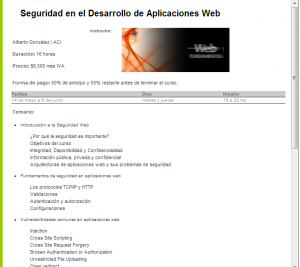
Por fin, después de un buen tiempo de planeación, generación de material, ejemplos y de más, está disponible el primer curso de Seguridad en el Desarrollo de Aplicaciones Web el cual impartiré en Activ.
Este curso es una recopilación de técnicas que ayudan a proteger las aplicaciones web contra ataques automatizados o dirigidos. Para ello será necesario conocer las diferentes arquitecturas utilizadas en Internet, las herramientas que existen para dichos ataques, entender criptografía y los protocolos involucrados en la transmisión, almacenamiento y procesamiento de información.
Basado en estándares de seguridad internacionales como NIST, SANS, OWASP, entre otros, se generó este curso bastante práctico que les permitirá generar y administrar sistemas web de forma segura evitando así incidentes que pudieran afectar su integridad.
Espero poder ver a algunos de ustedes por allá.
Centro de capacitación: Activ
Información del curso: http://activ.com.mx/cursos/web/seguridad-en-el-desarrollo-de-aplicaciones-web/
Microsoft Office documents encryption

This is a short post just for showing how you can protect your documents created with Microsoft Word, Excel and PowerPoint.
People love working with Microsoft Office documents. I think it’s a matter of simplicity and habit. So, one of my tasks is to give the user a safe way to protect their documents. We can use special tools for encrypting documents at byte level or hardware encryption or any other kind of tools but all of them will fail if they are not easy enough to implement.
Some Microsoft office programs have a feature called “Encrypt with password”. This isn’t neater the typical protect document functionality that just prompts you for a password if you want to open a document (although it requires a password) nor the previous protect with password that used RC4 40-bit encryption. This is a complete encryption functionality that encrypts the whole document using the password as the key. This feature is available since Microsoft Office 2007 using AES for the encryption algorithm and by default 128 bits.
If you want to encrypt a document just go to the File menu, click on Info, then Document protect and finally Encrypt with password. A box will be shown and you just have to type and confirm a strong password. Be careful because as this is an encryption mechanism that will encrypt at byte level your file if you lost the password it can take years to decrypt your file in case it was feasible.
By default office programs don’t force a strong password to be typed but if you want users to always type a strong password you have to write some keys into the windows registry. You can read the details of these keys in this article but here is a extract.
HKEY_CURRENT_USERSoftwareMicrosoftOffice14.0CommonSecurityPasswordComplexity
HKEY_CURRENT_USERSoftwarePoliciesMicrosoftOffice14.0CommonSecurityPasswordComplexity

	* Value name: PolicyLevel
	* Value type: DWORD
	* Value data: [ 0 | 1 | 2 | 3 ]
	* Use 0 to for no complexity (default), 1 for minimum length, 2 for minimum length plus requiring 3 of 4 character groups, and 3 for all these checks plus enforcing Windows domain password rules.


	* Value name: MinLength
	* Value type: DWORD
	* Specifies the minimum length of password required.
Well, this is all for now.
El desperdicio de los correos electrónicos

Este post lo tenía pendiente desde hace tiempo debido a que se me hace increíble que, al día de hoy, no exista otro método mucho más práctico para resolver esta necesidad y que las opciones que han surgido con el tiempo no hayan alcanzado el suficiente nivel de adopción como para desplazar a las tecnologías que ya deberían ser obsoletas como el tradicional correo electrónico.
Continue reading El desperdicio de los correos electrónicos
HTTPS and the TLS handshake protocol.
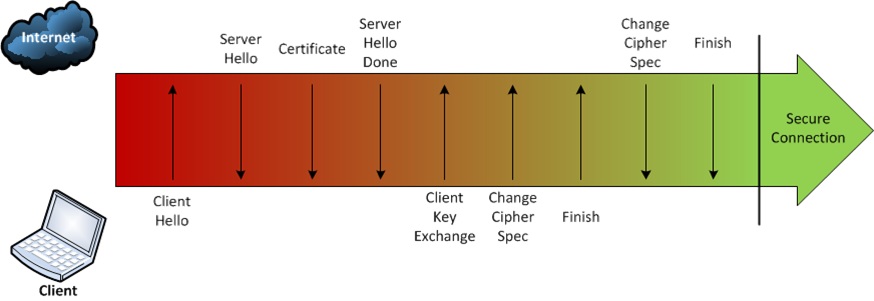
In the previous post I talked about how web browsers connect to the server and how a negotiation is initialized between server and client to establish a secure connection when the HTTPS protocol is used.
In this post I wil explain the SSL/TLS protocol and how a client (computer, smartphone, tablet, terminal, etc) and server can encrypt the data sent and received by an HTTPS connection.
Continue reading HTTPS and the TLS handshake protocol.
Web Browsers and HTTP/S connections

This is the first of a series of posts about HTTP/S that you will find in this blog during the next days. I will explain technical aspects about these protocols, how they work, how to test and validate connections, sites and certificates. I will also write about the encryption algorithms and more.
Continue reading Web Browsers and HTTP/S connections
Actualización del blog
Creo que es momento de actualizar un poco o mucho este blog. Secciones, páginas, información y de más.
Pronto verán cambios.
¿ Alguna recomendación ?
IceScrum and browsers troubles.
Few months ago I realized that the iceScrum version I use for job stop working on modern browsers.
When I tried to “Connect” with my account the system threw the next screen:

After trying different options, logs reviewing and more I could find a solution for the problem. I haven’t had time to dig into the iceScrum code but If you want to log into the system with modern browsers you just need to force the browsers to make all the requests with a different User-Agent in their headers.
As a former web developer I use to have all popular browsers installed just in case. I found the easiest way to change the User-Agent header is using Safari as web browser and activate the “Develop menu bar” from the Advanced tab in the preferences menu.

After that you just need to change the User-Agent in the Develop menu and try, for example, Safari 5.0.6. If you can not view the whole Menu Bar just press the <Alt> key.

And then just try to Connect again in iceScrum. You’ll have no more troubles.

Well, that’s all for now.